Showing posts with label HTC Software Tools. Show all posts

Procedures on How to Unlock Htc Tattoo, Htc Hero & Other Branded Orange UK

Here's a procedures on How  to Unlock Htc Tattoo, Htc Hero & Other Branded Orange UK. If ever encountered with an Htc Tattoo unlocking with code and enter it  and shows ok but continue to says unlocking sim card and nothing can't enter in network and if being  turned off and on it ask again the unlock code.
This unlocking solution covers for  Htc Tattoo, Htc Hero and other branded Orange with Android OS.
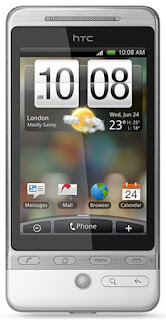

Download the 'ROM' Update for your HTC phone.

The 'ROM' can be downloaded from official website of HTC.com/uk/

Or from below link.

ROM for HTC Tattoo

ROM for HTC Hero

Install HTC Sync

Download

Now Run Rom upgrade utility, and wait till setup finished.


then put non accepted sim card. Enter the code.

Procedure on How to Change HTC ARTE100 language

HTC ARTE100 change language procedure


Software Tools you need:
V3 usb cable
Microsoft Active Sync Latest Version
Artemis_USPL
Artemis Vanilla 2.0 WWE

DOWNLOAD HERE:

Microsoft ActiveSync 4.5

Artemis USPL and Manual

Artemis Vanilla 2.0 WWE


PROCEDURE

I:

install Microsoft ActiveSync 4.5 for those who didnt used yet the active SYNC

II:

Connect USB cable to COMPUTER and automatically install the DRIVER

III:

Open the Artemis USPL
READ THE MANUAL FOR REFERENCE and GUIDE

MORE INFO ABOUT THESE:

Artemis Update SPL (USPL) v.01 - Another way to flash *ANY* rom to your device!
This is a patched SPL for HTC Artemis devices (HTC P3300 / T-Mobile MDA compact III / O2 XDA Orbit / Dopod P800W / Dopod P800 / Dopod M700 / Orange SPV M650).

This SPL is based on original Artemis 1.11 SPL but includes 3 patches:

1. SuperCID / SecLevel=0 (set 32)
2. Does not check Model ID
3. Does not check signature*


code must be formally signed i.e. contain properly-formated signatures on their places, however no checking are performed against them.

This means you can flash ANY ROM to your Artemis after flashing USPL on it, no need to pay for CID unlock anymore!

Disclaimer:
This is free to use but at your own risk, I take no responsibility for any conflict, fault, or damage caused to your phone by this unlocking procedure. No warranties of any kind are given. Any commercial usage prohibited.

Instructions:
1. Unzip
2. Connect your phone to computer, make sure activesync is enabled (green icon)
3. Run start_uspl.exe on your computer and wait until process finishes
4. See Artemis_USPL_Manual.zip (PDF) for more detailed instructions!

Open folder Artemis Vanilla 2.0 WWE and Click the start_uspl
wait till the RomUpdateUtility will automatically appear and read , follow carefully the instruction in the Software till end and finish